
(C#) MD5 Hashfile Checksum 검사 자동화
🐠 MD5란?
MD5(Message-Digest algorithm 5)는 128비트 암호화 해시 함수이다.
RFC 1321로 지정되어 있으며,
주로 프로그램이나 파일이 원본 그대로인지를
확인하는 무결성 검사 등에 사용된다.
1991년에 로널드 라이베스트가 예전에 쓰이던 MD4를 대체하기 위해 고안했다.
1996년에 MD5의 설계상 결함이 발견되었다.
이것은 매우 치명적인 결함은 아니었지만,
암호학자들은 해시 용도로 SHA-1과 같이 다른 안전한 알고리즘을 사용할 것을 권장하기 시작했다.
2004년에는 더욱 심한 암호화 결함이 발견되었고.
2006년에는 노트북 컴퓨터 한 대의 계산 능력으로
1분 내에 해시 충돌을 찾을 정도로 빠른 알고리즘이 발표되기도 하였다.
현재는 MD5 알고리즘을 보안 관련 용도로 쓰는 것은 권장하지 않으며,
심각한 보안 문제를 야기할 수도 있다.
2008년 12월에는 MD5의 결함을 이용해 SSL 인증서를 변조하는 것이 가능하다는 것이 발표되었다.
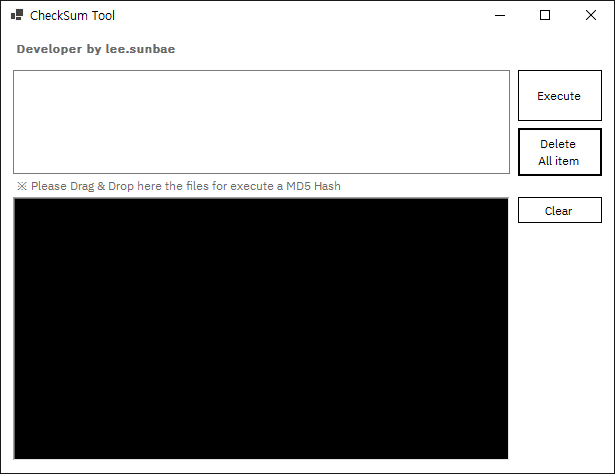
🦋 메인화면 구성
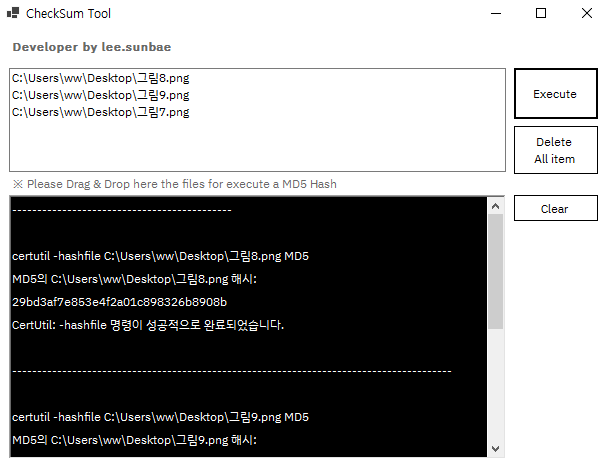
🐝 MD5 검사 결과
🐬 Source Code - Class
using System;
using System.Collections.Generic;
using System.Diagnostics;
using System.IO;
using System.Text;

namespace MD5_Hash_Auto
{
    class sg_class
    {

        public void main()
        {

        }

        public string RunExecute(string strKey)
        {
            ProcessStartInfo pri = new ProcessStartInfo();
            Process pro = new Process();

            pri.FileName = @"cmd.exe";
            pri.CreateNoWindow = true;
            pri.UseShellExecute = false;

            pri.RedirectStandardInput = true;                //표준 출력을 리다이렉트
            pri.RedirectStandardOutput = true;
            pri.RedirectStandardError = true;

            pro.StartInfo = pri;
            pro.Start();   //어플리케이션 실

            pro.StandardInput.Write(strKey + Environment.NewLine);
            pro.StandardInput.Close();

            System.IO.StreamReader sr = pro.StandardOutput;

            string resultValue = sr.ReadToEnd();

            Debug.Print(resultValue + "  <--- 메서드 내 결과");

            pro.WaitForExit();
            pro.Close();

            return resultValue == "" ? "" : resultValue;

        }

        public string GetResourceFileName()
        {
            String strAppPath = Path.GetDirectoryName(System.Diagnostics.Process.GetCurrentProcess().MainModule.FileName);
            String strFilePath = Path.Combine(strAppPath, "Resources");
            String strFullFilename = Path.Combine(strFilePath, "fciv.exe"); // Resource에 담겨진 allpair의 경로를 exe 에서 바로 가져오기 위해 path를 가져옴..
            Debug.Print(strFullFilename);

            return strFullFilename == "" ? "" : strFullFilename;

        }

    }

}
🐸 Source Code - Main
using System;
using System.Collections.Generic;
using System.ComponentModel;
using System.Data;
using System.Diagnostics;
using System.Drawing;
using System.IO;
using System.Linq;
using System.Text;
using System.Threading.Tasks;
using System.Windows.Forms;

namespace MD5_Hash_Auto
{
    public partial class Main_form : Form
    {

        private sg_class sg;

        public Main_form()
        {
            InitializeComponent();

            lst_files.AllowDrop = true;

            init_Event();

           sg = new sg_class();

        }

        private void init_Event()
        {
            this.btn_clear.Click += new EventHandler(this.richText_clear);
            this.btn_exe.Click += new EventHandler(this.executeRun);

            this.lst_files.DragDrop += new DragEventHandler(lstfile_DragDrop);
            this.lst_files.DragEnter += new DragEventHandler(lstfile_DragEnter);

            this.btn_init.Click += new EventHandler(this.deleteAllItem);
        }

        private void lstfile_DragEnter(object sender, DragEventArgs e)
        {
            if (e.Data.GetDataPresent(DataFormats.FileDrop))
            {
                e.Effect = DragDropEffects.Copy;
            }
        }

        private void lstfile_DragDrop(object sender, DragEventArgs e)
        {
            string[] files = (string[])e.Data.GetData(DataFormats.FileDrop);

            foreach (string s in files)
            {
                lst_files.Items.Add(s);
            }
        }

        /// <summary>
        /// RichTextBox 내용 초기화 메서드
        /// </summary>
        /// <param name="sender"></param>
        /// <param name="e"></param>
        private void richText_clear(object sender, EventArgs e)
        {
            rtxt_result.Clear();
        }

        private void deleteAllItem(object sender, EventArgs e)
        {
            lst_files.Items.Clear();
        }


        /// <summary>
        /// MD5 Check 무결성
        /// </summary>
        /// <param name="sender"></param>
        /// <param name="e"></param>
        private void executeRun(object sender, EventArgs e)
        {
            // 실제 파일 드래그 했을 때 exe 창에 표시 되도록
            string fciv = sg.GetResourceFileName();

            if (lst_files.Items.Count == 0)
            {
                MessageBox.Show("무결성 확인을 위한 파일을 추가해주세요.");
            }
            else
            {
                foreach (string s in lst_files.Items)
                {
                    string filePath = Path.Combine(s);


                    // 실제 MD5 Hash Check
                    string resultText = sg.RunExecute($"certutil -hashfile {s} MD5");

                    //resultText = resultText.Replace(s, string.Empty);

                    // 명령어 Path 잘라내기
                    resultText = resultText.Replace(Application.StartupPath.ToString().Substring(0, Application.StartupPath.Length - 1), string.Empty);

                    resultText = resultText.Replace(">", string.Empty);

                    // 테스트 코드 (쓸 때 없는 텍스트를 지워주기 위해 임시로 테스트 )
                    string cutText = resultText;
                    string outputText;
                    outputText = cutText.Substring(cutText.IndexOf("All rights reserved."));
                    outputText = outputText.Replace("All rights reserved.", string.Empty);

                    rtxt_result.AppendText("--------------------------------------------");
                    rtxt_result.AppendText($"\r\r{outputText}");
                    // rtxt_result.AppendText(string.Format("{0}", "--------------------") );
                    rtxt_result.AppendText("--------------------------------------------");
                }
            }

        }

        private void lst_files_KeyDown(object sender, KeyEventArgs e)
        {
            if (e.KeyCode == Keys.Delete)
            {
                //delete
                ((ListBox)sender).Items.RemoveAt(((ListBox)sender).SelectedIndex);
            }
        }
    }
}
다운로드
Download Link : Click!
댓글남기기